
How to connect WordPress to Claude

Last verified
Quick answer
On WordPress.com, add the official WordPress.com connector in Claude under Customize, then Connectors. It needs a paid plan. On a self-hosted site, install the official MCP Adapter plugin plus a plugin that adds content abilities, such as Enable Abilities for MCP, then connect Claude Code with an Application Password.
Key facts
- WordPress.com has an official Claude connector, made by Automattic. It needs a paid WordPress.com plan, though free sites can use it for their first 30 days.
- Self-hosted WordPress 6.9 or later uses the official MCP Adapter plugin, which serves MCP at
/wp-json/mcp/mcp-adapter-default-server. - On its own, MCP Adapter only shares site and user info. To read and write posts, add a plugin that registers content abilities.
- Claude works with the permissions of the WordPress user you connect as. Use a dedicated Editor account, not an admin.
- Claude.ai in the browser can only reach a self-hosted site that is public on HTTPS.
Which way should you connect WordPress to Claude?
Every way to connect WordPress to Claude that we could verify, official and community.
| Method | Works in | Auth | Last update | Status | Reader reports |
|---|---|---|---|---|---|
| WordPress.com connector Official connector · Automattic Needs: A paid WordPress.com plan, or a free site in its first 30 days | Claude.ai, Claude Desktop, Claude Code | OAuth sign-in | n/a | active | None yet |
| MCP Adapter (self-hosted) Official MCP server · WordPress.org Needs: WordPress 6.9+ and a plugin that adds content abilities | Claude Code, Claude Desktop | API key | Oct 2, 2026 | active | None yet |
| Enable Abilities for MCP Plugin · Fabio Montenegro Needs: MCP Adapter | Claude Code, Claude Desktop, Claude.ai | API key | Sep 18, 2026 | active | None yet |
| AI Engine Community MCP server · Meow Apps | Claude Code, Claude Desktop | API key | Oct 1, 2026 | active | None yet |
| mcp-wordpress-remote Community MCP server · Automattic Needs: Node.js 22+ | Claude Code, Claude Desktop | API key | Sep 28, 2026 | broken | None yet |
- WordPress.com connector: The easiest route if your site is on WordPress.com. Claude asks you to confirm every change, and it can only do what your WordPress.com role allows.
- MCP Adapter (self-hosted): The official way to connect a self-hosted site. On its own it can't touch posts, so pair it with a content plugin like the one below.
- Enable Abilities for MCP: Adds the abilities Claude needs to read and write posts, pages, categories, comments and more, each with its own on/off switch. It also includes a sign-in flow for Claude.ai, which we haven't tested.
- AI Engine: A popular all-in-one AI plugin with its own MCP server. Its makers warn that it gives Claude full admin access to your site.
- mcp-wordpress-remote: The proxy that MCP Adapter's docs recommend. It currently fails against MCP Adapter 0.7.0 (issue #120). Connect directly over HTTP instead, as shown below.
How to connect a self-hosted WordPress site to Claude Code
Recommended · Claude Code · uses MCP Adapter (self-hosted)
- 1
Check you're on WordPress 6.9 or later. In Plugins, then Add New, install and activate
MCP AdapterandEnable Abilities for MCP. Or use WP-CLI:Terminalwp plugin install mcp-adapter enable-abilities-for-mcp --activate - 2
Create a dedicated user for Claude with the Editor role, so it can manage content but not plugins or settings.
Terminalwp user create claude-bot [email protected] --role=editor - 3
Create an Application Password for that user, in Users, then Profile, then Application Passwords. Or with WP-CLI. Copy it now: it's only shown once. Your site needs HTTPS for this to work.
Terminalwp user application-password create claude-bot claude-code --porcelain - 4
Optional: open the Enable Abilities for MCP settings and switch off anything you don't want Claude to do, such as deleting posts.
- 5
Add the site to Claude Code. Replace the URL, and
YOUR-APP-PASSWORDwith the password from step 3.TerminalB64=$(printf 'claude-bot:YOUR-APP-PASSWORD' | base64) claude mcp add --transport http wordpress https://your-site.com/wp-json/mcp/mcp-adapter-default-server \ --header "Authorization: Basic $B64" - 6
Check the connection: in Claude Code, run
/mcpand look forwordpress. Then ask Claude about your posts.
We tested it
Checked against the source on Oct 5, 2026.
How to connect WordPress.com to Claude
Alternative · Claude.ai, Claude Desktop and Claude Code · uses WordPress.com connector
- 1
On WordPress.com, open your account Preferences, then AI and MCP, and turn on Enable MCP access.
- 2
In Claude, open Customize, then Connectors. Click the + button, find WordPress.com, click Connect, then sign in to WordPress.com and approve access.
- 3
For Claude Code, add the connector from the terminal, then run
/mcpinside Claude Code to sign in.Terminalclaude mcp add --transport http wpcom-mcp https://public-api.wordpress.com/wpcom/v2/mcp/v1
Checked against the source on Oct 5, 2026.
Access and permissions
- Self-hosted
- The Application Password signs Claude in as that user, so it can do whatever the role allows. An Editor can write, publish and delete posts and pages, but can't change plugins or settings. Ability switches in Enable Abilities for MCP narrow it further.
- WordPress.com
- Read and write access are both on once MCP is enabled, and Claude asks you to confirm each change. Deleted posts and pages stay in the trash for 30 days, but deleted media, categories and tags are gone for good.
- Revoking access
- Self-hosted: revoke the password in Users, then Profile, then Application Passwords. WordPress.com: disconnect Claude under Security, then Connected Apps. In Claude Code, also run
claude mcp remove wordpress. - Claude.ai on the web
- Custom connectors connect from Anthropic's servers, so a self-hosted site must be public on HTTPS. A site on your own computer or office network won't work; use Claude Code instead.
What can you do after connecting WordPress to Claude?
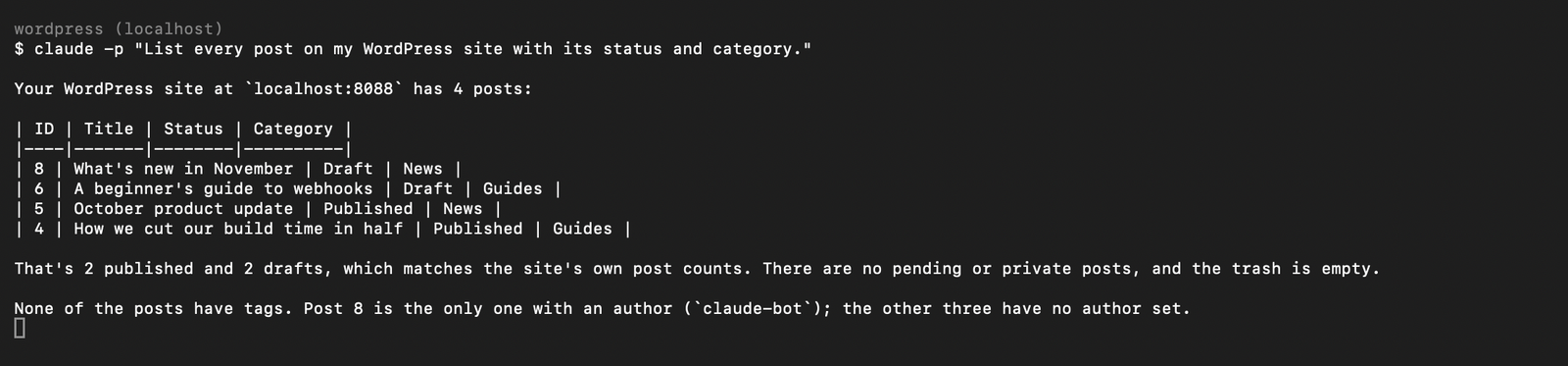
“List every post on my WordPress site with its status and category.”
Claude returns a table of every post, including drafts, with status and category, and checks it against the site's own counts.
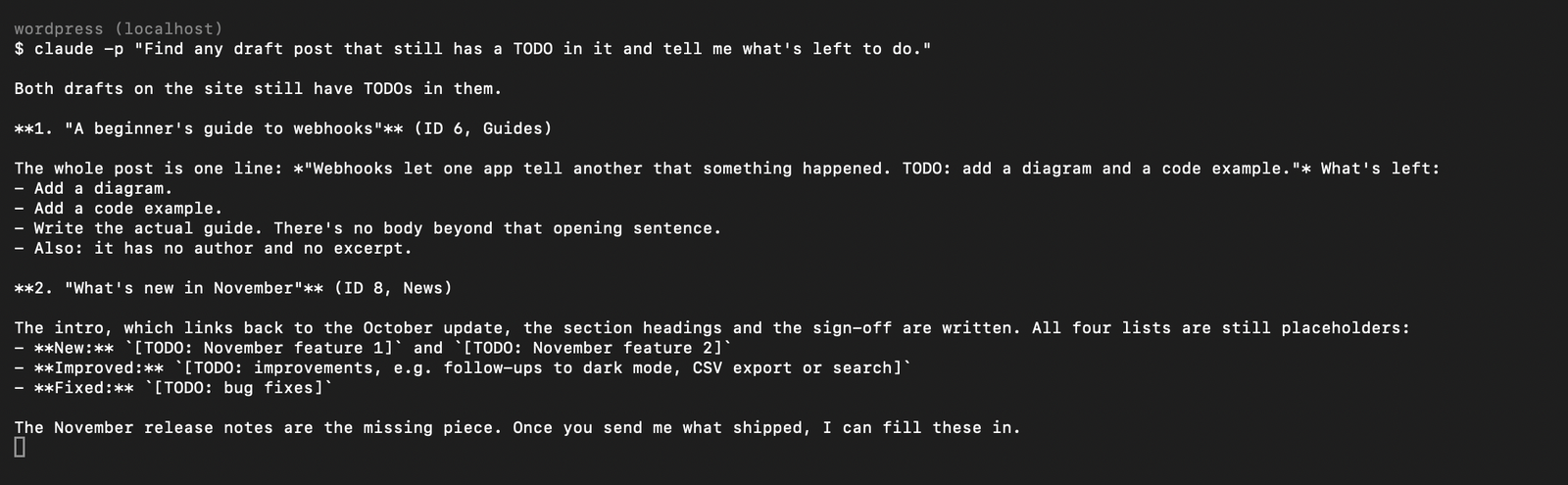
“Find any draft post that still has a TODO in it and tell me what's left to do.”
Claude reads each draft, quotes the TODO notes, and lists what's missing, such as an excerpt or the body itself.
“Which pages are published on my site, and is anything still in draft?”
Claude lists published pages with their links, flags drafts, and suggests cleanups like WordPress's default Sample Page.
“Write a short draft post titled 'What's new in November' that follows on from the October product update. Save it as a draft in the News category. Don't publish it.”
Claude reads the October post, writes a draft that links back to it, and saves it unpublished in News. Where it didn't have facts, it left clear placeholders instead of inventing them.
Troubleshooting
401orrest_forbiddeneven though the Application Password is right- WordPress only accepts Application Passwords over HTTPS. Serve the site on HTTPS. For a local test site, set
WP_ENVIRONMENT_TYPEtolocalin wp-config.php. Source - Claude connects but can't see any posts
- MCP Adapter on its own only shares site and user info. Install a content-abilities plugin such as Enable Abilities for MCP, and check its read and write abilities are switched on. Source
MCP-Protocol-Version must be 2025-11-25with mcp-wordpress-remote- The proxy sends an older protocol version than MCP Adapter 0.7.0 accepts. Connect Claude Code straight to the HTTP endpoint with a Basic auth header, as in the setup above. Source
- Authentication fails only on your live server
- Some hosts strip the Authorization header. On Apache, add
SetEnvIf Authorization "(.*)" HTTP_AUTHORIZATION=$1to .htaccess. On Nginx with PHP-FPM, pass the header through to PHP. Source
FAQ
Is there an official WordPress connector for Claude?
Yes, for WordPress.com: Automattic makes the WordPress.com connector in Claude's connector directory. For self-hosted WordPress, the official route is WordPress.org's MCP Adapter plugin.
Does it work with self-hosted WordPress?
Yes. Install MCP Adapter plus a plugin that adds content abilities, create an Application Password for a dedicated user, and add the site to Claude Code. Your site needs WordPress 6.9 or later and HTTPS.
Can Claude publish or delete posts?
Only if the abilities are switched on and the user you connect as is allowed to. Connect as an Editor rather than an admin, and switch off delete abilities if you don't want Claude removing content. On WordPress.com, Claude asks you to confirm every change.
Do I need a paid plan?
On WordPress.com, MCP access needs a paid plan; free sites get it for their first 30 days. For self-hosted WordPress, MCP Adapter and Enable Abilities for MCP are free plugins.
Can I use Claude.ai with a self-hosted site?
Only if the site is public on HTTPS, because Claude.ai connects from Anthropic's servers. Enable Abilities for MCP includes a Claude.ai sign-in flow for this. For a private or local site, use Claude Code.
Did it work for you?
0No reports yet. Tried connecting WordPress to Claude? Say what worked and what didn't.