
How to connect Home Assistant to Claude

Last verified
Quick answer
Home Assistant has an official MCP Server integration. Turn it on, create a long-lived access token, and add http://<your-home-assistant>:8123/api/mcp to Claude Code with that token. Claude can then control the devices you expose to Assist. Claude.ai and Claude Desktop connectors need Home Assistant on a public HTTPS address, such as Home Assistant Cloud.
Key facts
- Home Assistant's built-in Model Context Protocol Server integration, added in 2025.2, serves MCP at
/api/mcp. - Claude can only see and control devices exposed to Assist. Locks, alarms and cameras are not exposed by default.
- Claude Code connects over your local network with a long-lived access token.
- Claude.ai and Claude Desktop custom connectors connect from Anthropic's cloud, so Home Assistant must be reachable on a public HTTPS address.
- Since 2026.9, tool names start with their domain, for example
intent__HassTurnOff.
Which way should you connect Home Assistant to Claude?
Every way to connect Home Assistant to Claude that we could verify, official and community.
| Method | Works in | Auth | Last update | Status | Reader reports |
|---|---|---|---|---|---|
| MCP Server integration Official MCP server · Home Assistant Needs: Home Assistant 2025.2 or later | Claude Code, Claude Desktop, Claude.ai | API key | Sep 27, 2026 | active | None yet |
| ha-mcp Community MCP server · homeassistant-ai Needs: uv, or the Home Assistant add-on | Claude Code, Claude Desktop | API key | Oct 4, 2026 | active | None yet |
| hass-mcp Community MCP server · voska Needs: uv or Docker | Claude Code, Claude Desktop | API key | Aug 6, 2026 | active | None yet |
- MCP Server integration: Built into Home Assistant. Claude gets the same controls as the Assist voice assistant, limited to the devices you expose to it. Sign in with a token, or with OAuth for Claude.ai.
- ha-mcp: The most popular community server. It reaches everything in Home Assistant, not just exposed devices, including automations, history and logs. More power, so more care is needed.
- hass-mcp: A smaller community server for reading entities, calling services and checking history and logs.
How to connect Home Assistant to Claude Code
Recommended · Claude Code · uses MCP Server integration
- 1
In Home Assistant, go to Settings, then Devices & services, and add the
Model Context Protocol Serverintegration. Choose Assist as the API. - 2
Check what Claude will be able to control in Settings, then Voice assistants, then the Expose tab. Leave locks, alarms and garage doors off unless you really want Claude to use them.
- 3
Open your user profile, go to the Security tab, and create a long-lived access token. Copy it now: it's only shown once.
- 4
Add Home Assistant to Claude Code. Replace the address with your own and
YOUR_TOKENwith the token.Terminalclaude mcp add --transport http homeassistant http://homeassistant.local:8123/api/mcp \ --header "Authorization: Bearer YOUR_TOKEN" - 5
Check the connection: in Claude Code, run
/mcpand look forhomeassistant. Then ask what's on, or ask Claude to turn something off.
We tested it
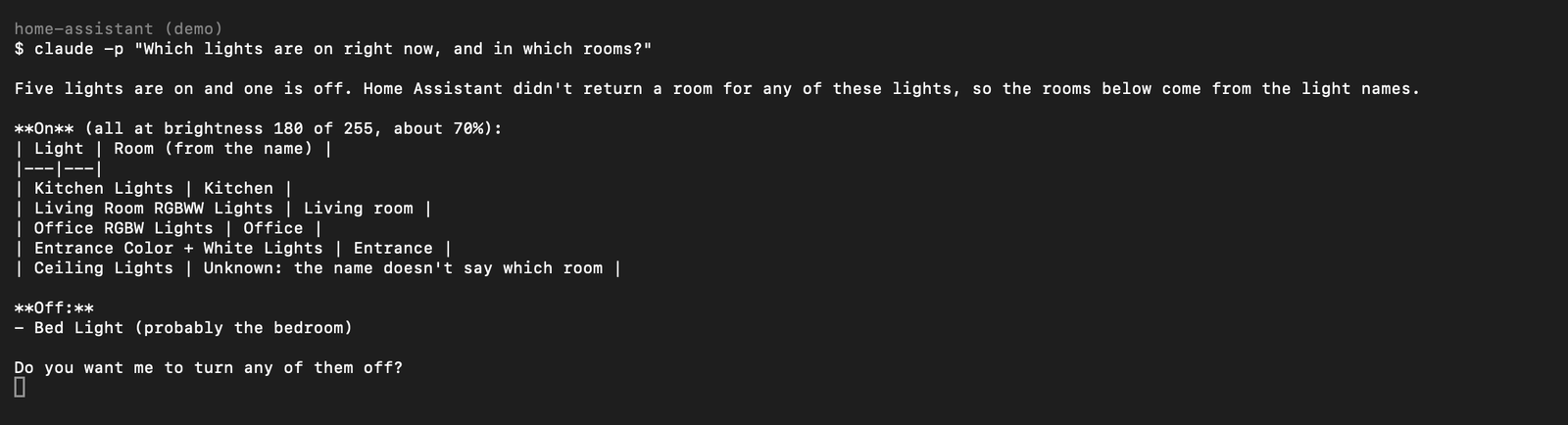


Checked against the source on Oct 5, 2026.
How to connect Home Assistant to Claude.ai or Claude Desktop
Alternative · Claude.ai and Claude Desktop · uses MCP Server integration
- 1
Make Home Assistant reachable on a public HTTPS address, and set that as its External URL. Home Assistant Cloud is the simplest way: its docs recommend it to avoid proxy and tunnel problems.
- 2
In Claude, open Customize, then Connectors. Click + and choose Add custom connector.
- 3
Enter
https://<your-external-url>/api/mcpas the server URL. Under Advanced settings, set the OAuth Client ID tohttps://claude.aiand leave the secret blank. - 4
Connect, sign in to Home Assistant when asked, and approve access.
Checked against the source on Oct 5, 2026.
Access and permissions
- What Claude can control
- With the built-in integration, only devices exposed to Assist. In our test, Claude could switch lights but refused to lock the front door, because locks aren't exposed by default.
- The token
- A long-lived token lasts 10 years and carries the full rights of the user who created it. Exposure limits what the MCP tools can do, not the token itself. Consider a separate, non-admin user for Claude. From 2026.10, non-admin users connect through
/api/mcp/assist. - Revoking access
- Delete the token in your user profile, on the Security tab. In Claude Code, also run
claude mcp remove homeassistant. - Community servers
- ha-mcp and hass-mcp use the Home Assistant API directly, so they can reach everything the token can, not just exposed devices.
What can you do after connecting Home Assistant to Claude?
“Which lights are on right now, and in which rooms?”
Claude reads the live state of every exposed light and returns which are on, their brightness, and the room each one is in.
“What are my thermostats set to, and what's the current temperature?”
Claude lists each thermostat's mode, target and current temperature, and points out which ones are likely heating or cooling.
“Turn off the kitchen lights.”
Claude turns the light off and confirms it. If the light isn't assigned to a room, it falls back to the light's name and tells you how to fix the room.
“Add 'buy milk' to my shopping list.”
Claude adds the item to Home Assistant's shopping list.
“Lock the front door.”
With default settings Claude can't, because locks aren't exposed. It tells you where to expose the lock if you want it to.
Troubleshooting
404 Not Foundon/api/mcp- The MCP Server integration isn't set up yet. Add it in Settings, then Devices & services. Source
401when connecting- The token is wrong or was deleted. Create a new one. From 2026.10, a non-admin user also gets this on
/api/mcp: use/api/mcp/assist, or turn off Require an administrator account in the integration's options. Source - Claude says it can't find a device that exists
- The device isn't exposed to Assist. Turn it on in Settings, then Voice assistants, then Expose, and ask again. Source
- Claude Desktop shows the server as disconnected when using mcp-proxy
- Current mcp-proxy releases crash with a newer MCP library (
cannot import name 'request_ctx'). Run it withuvx --with "mcp<2.0.0" mcp-proxy, or use the remote connector instead. Source
FAQ
Does Home Assistant have an official Claude integration?
Yes. The Model Context Protocol Server integration, built into Home Assistant since 2025.2, lets Claude control your home. There's also a separate Anthropic integration that works the other way round: it lets Home Assistant's voice assistant use Claude.
Can Claude unlock my doors?
Only if you expose the lock to Assist. Locks, alarms and cameras aren't exposed by default, and in our test Claude refused to lock a door that wasn't exposed.
Do I need Home Assistant Cloud?
Not for Claude Code, which connects over your local network. Claude.ai and Claude Desktop connectors connect from Anthropic's cloud, so they need a public HTTPS address, and Home Assistant Cloud is the simplest way to get one.
What's the difference between the built-in server and ha-mcp?
The built-in server gives Claude the Assist voice controls for exposed devices only. ha-mcp reaches all of Home Assistant, including automations, history and logs, so it can do more but needs more care.
Which Home Assistant version do I need?
2025.2 or later for the MCP Server integration. We tested with 2026.9.4.
Did it work for you?
0No reports yet. Tried connecting Home Assistant to Claude? Say what worked and what didn't.