
How to connect Obsidian to Claude

Last verified
Quick answer
Obsidian has no official Claude connector. The quickest route is to start Claude Code inside your vault folder (cd into it and run claude): a vault is plain Markdown, so Claude can read, search and edit notes with no plugin. For Claude Desktop, use the Local REST API with MCP community plugin, which includes its own MCP server. Claude.ai in the browser can't reach a vault stored on your computer.
Key facts
- Obsidian has no official Claude connector or official MCP server (checked October 2026).
- Claude Code can work on an Obsidian vault directly: start
claudeinside the vault folder. No plugin is needed. - For Claude Desktop, the Local REST API with MCP community plugin includes an MCP server at
https://127.0.0.1:27124/mcp/. - Claude.ai in the browser can't connect to a vault stored on your computer.
- Claude Code asks before it edits or creates a note, unless you change its permission mode.
Which way should you connect Obsidian to Claude?
Every way to connect Obsidian to Claude that we could verify, official and community.
| Method | Works in | Auth | Last update | Status | Reader reports |
|---|---|---|---|---|---|
| Claude Code in your vault folder No MCP needed · Anthropic (Claude Code) | Claude Code | Local only | n/a | active | None yet |
| Local REST API with MCP (plugin) Community MCP server · Adam Coddington Needs: Obsidian desktop running with the plugin enabled | Claude Code, Claude Desktop | API key | Oct 3, 2026 | active | None yet |
| obsidian-mcp Community MCP server · Steven Stavrakis Needs: Node.js 22 or later | Claude Code, Claude Desktop | Local only | Aug 14, 2026 | active | None yet |
| obsidian-mcp-server Community MCP server · cyanheads Needs: Local REST API plugin 4.0+, Node.js 24+ | Claude Code, Claude Desktop | API key | Sep 23, 2026 | active | None yet |
| mcp-obsidian Community MCP server · Markus Pfundstein Needs: Local REST API plugin, uv | Claude Code, Claude Desktop | API key | Aug 31, 2026 | active | None yet |
| obsidian-skills Plugin · Steph Ango (kepano) | Claude Code | None | Sep 15, 2026 | active | None yet |
- Claude Code in your vault folder: The simplest option. Claude Code reads your notes as ordinary files, so there is nothing to install and Obsidian can stay closed. Claude asks before it changes anything.
- Local REST API with MCP (plugin): The best choice for Claude Desktop. Since version 4.0 the plugin includes its own MCP server, so you don't need a separate one. Obsidian has to stay open while you use it.
- obsidian-mcp: Good if you'd rather not install a plugin. It works on your note files directly, with no API key, and Obsidian can stay closed.
- obsidian-mcp-server: Good if you want limits. You can keep Claude to certain folders, or let it read but not write.
- mcp-obsidian: The most popular Obsidian MCP server, but partly broken with the current plugin. Claude can read notes, add to them and rewrite them, but can't edit just part of a note (issue #158).
- obsidian-skills: Not a connection by itself. Add it to Claude Code so Claude writes proper Obsidian links, properties, Bases and Canvas files. Made by Obsidian's CEO, Steph Ango, but published on his personal GitHub rather than by Obsidian.
How to connect Obsidian to Claude Code (no plugin)
Recommended · Claude Code · uses Claude Code in your vault folder
- 1
Install Claude Code if you don't have it yet, by following the quickstart at code.claude.com/docs.
- 2
Find your vault: it's the folder you chose when you created it in Obsidian. Every note in it is a
.mdfile. - 3
Open a terminal, go into the vault folder and start Claude Code.
Terminalcd "/path/to/your/vault" claude - 4
Ask about your notes in plain English. Claude reads files without asking, and asks before it edits or creates one.
- 5
Already working in another project? Add the vault as an extra directory instead of switching folders.
Terminalclaude --add-dir "/path/to/your/vault" - 6
Optional: install Steph Ango's Obsidian skills so Claude writes valid wikilinks, properties, Bases and Canvas files. Run these inside Claude Code.
Claude Code/plugin marketplace add kepano/obsidian-skills /plugin install obsidian@obsidian-skills
We tested it
![Claude Code in a terminal finding the two notes that link to [[Priya]] and the open task owed to her](/connectors/obsidian/claude-code-priya.png)
Checked against the source on Oct 5, 2026.
How to connect Obsidian to Claude Desktop with MCP
Alternative · Claude Code and Claude Desktop · uses Local REST API with MCP (plugin)
- 1
In Obsidian, open Settings, then Community plugins. Browse for
Local REST API with MCP, then install and enable it. - 2
Open Settings, then Local REST API, and copy your API key. Obsidian must stay open while Claude uses the vault.
- 3
For Claude Code, add the server. Replace
<your-api-key>with the key you copied.Terminalclaude mcp add --transport http obsidian https://127.0.0.1:27124/mcp/ \ --header "Authorization: Bearer <your-api-key>" - 4
For Claude Desktop, add this to
claude_desktop_config.json(macOS:~/Library/Application Support/Claude/, Windows:%APPDATA%\Claude\), then quit and reopen Claude Desktop. It needs Node.js fornpx.claude_desktop_config.json{ "mcpServers": { "obsidian": { "command": "npx", "args": [ "mcp-remote@latest", "https://127.0.0.1:27124/mcp/", "--header", "Authorization: Bearer <your-api-key>" ] } } } - 5
Check the connection: in Claude Code, run
/mcpand look forobsidian. If it fails with a certificate error, see Troubleshooting below.
Checked against the source on Oct 5, 2026.
Access and permissions
- Folder route
- Claude Code can read any file in the folder you started it in, and in folders added with
--add-dir. It asks before every edit unless you switch to a mode that accepts edits. Nothing is installed in Obsidian, and closing Claude Code ends its access. - Plugin route
- The API key gives full read and write access to the vault, including deleting and moving notes. By default the plugin only listens on your own computer (
127.0.0.1), and its MCP server refuses to touch the.obsidiansettings folder. - Revoking access
- Run
claude mcp remove obsidianin Claude Code, delete theobsidianentry fromclaude_desktop_config.json, or turn the plugin off in Obsidian's Community plugins settings. - Claude.ai on the web
- Custom connectors on Claude.ai connect from Anthropic's servers and must be reachable over the public internet, so they can't reach a vault on your computer. Use Claude Code or Claude Desktop.
What can you do after connecting Obsidian to Claude?
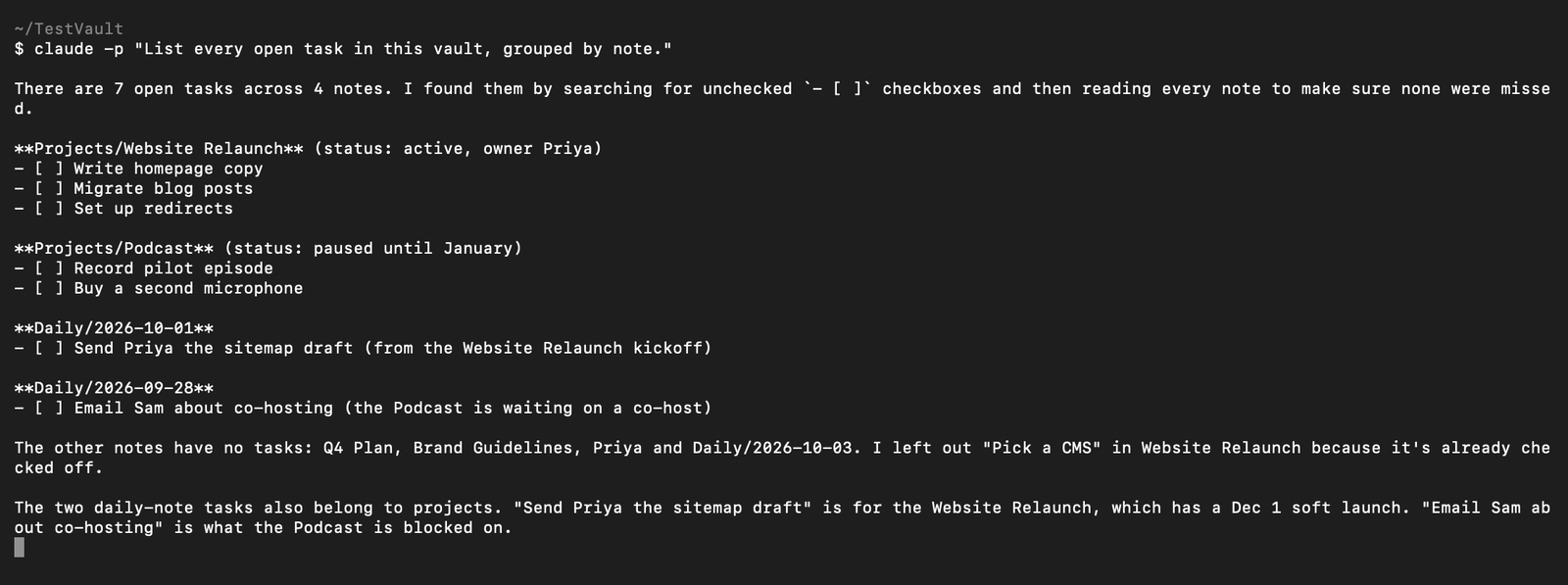
“List every open task in this vault, grouped by note.”
Claude finds every unchecked
- [ ]item, groups them by note, and points out which daily-note tasks belong to which project.“Summarize my daily notes from the last week: what did I decide and what is still open?”
Claude reads the week's daily notes and the notes they link to, then lists decisions and open items. It also flags where two notes disagree.
“Find every note that links to [[Priya]] and tell me what I owe her.”
Claude follows backlinks to a person's note and pulls out open tasks that mention them. Swap in any note name.
“Which notes have no links to or from any other note?”
Claude checks links in both directions and lists orphan notes, with a table of how the rest connect.
“Create a note in Projects called 'Q4 Plan' that links to every project with status active, using Obsidian [[wikilinks]].”
Claude reads the
statusproperty on each project, then writes a new note with wikilinks to the active ones. It asks before creating the file.
Troubleshooting
- Claude says it can't find my notes
- Claude Code only sees the folder it was started in. Quit,
cdinto the vault and runclaudeagain, or start it with--add-dir "/path/to/your/vault". Source - Certificate or TLS error when connecting to
https://127.0.0.1:27124/mcp/ - The plugin signs its HTTPS certificate with its own authority, which your system doesn't trust yet. Download it from
https://127.0.0.1:27124/obsidian-local-rest-api.crtand trust it. Or turn on "Enable non-encrypted (HTTP) server" in the plugin settings and usehttp://127.0.0.1:27123/mcp/instead. Source - Connection refused
- The plugin only runs while Obsidian is open. Open Obsidian, check the plugin is enabled, and confirm the port matches the plugin settings (27124 for HTTPS by default). Source
spawn uvx ENOENTin Claude Desktop (mcp-obsidian)- Claude Desktop can't find
uv. Install it, or runwhich uvxin a terminal and put that full path in thecommandfield of the config. Source obsidian_patch_contentfails with error 40084 (mcp-obsidian)- Version 5 of the plugin needs a header that mcp-obsidian doesn't send yet. Use the plugin's built-in MCP server instead, or have Claude append to or rewrite the whole note. Source
FAQ
Is there an official Obsidian connector for Claude?
No. As of October 2026 there is no Obsidian connector in Anthropic's directory and no official MCP server from Obsidian. The options are Claude Code working on the vault folder directly, or a community plugin or MCP server.
Can I use my Obsidian vault with Claude.ai in the browser?
Not directly. Claude.ai custom connectors connect from Anthropic's servers, so they can't reach a vault stored on your computer. Use Claude Code or Claude Desktop instead.
Does Obsidian need to be open?
For the folder route and for obsidian-mcp, no: they read the Markdown files directly. For the Local REST API plugin and the servers built on it, yes: the plugin only runs while Obsidian is open.
Will Claude change my notes without asking?
Not by default. Claude Code reads files freely but asks before every edit unless you switch to a permission mode that accepts edits. Back up your vault or use Git before letting it make large changes.
Which Obsidian MCP server should I use?
If you want Obsidian-aware features such as search, tags and running commands, use the MCP server built into the Local REST API with MCP plugin. If you'd rather not install a plugin, obsidian-mcp works on the files directly. For Claude Code alone, you may not need an MCP server at all.
Did it work for you?
0No reports yet. Tried connecting Obsidian to Claude? Say what worked and what didn't.